RADIO FOR BEATMAKERS. TUNE IN. CHOP UP.
There is a particular kind of serendipity that only happens with radio. You tune in, you do not know what is coming, and then something lands right in your ear that you did not know you were looking for.
For music producers, beatmakers, and crate diggers, stumbling upon one of those lucky breaks is big part of the sampling process.
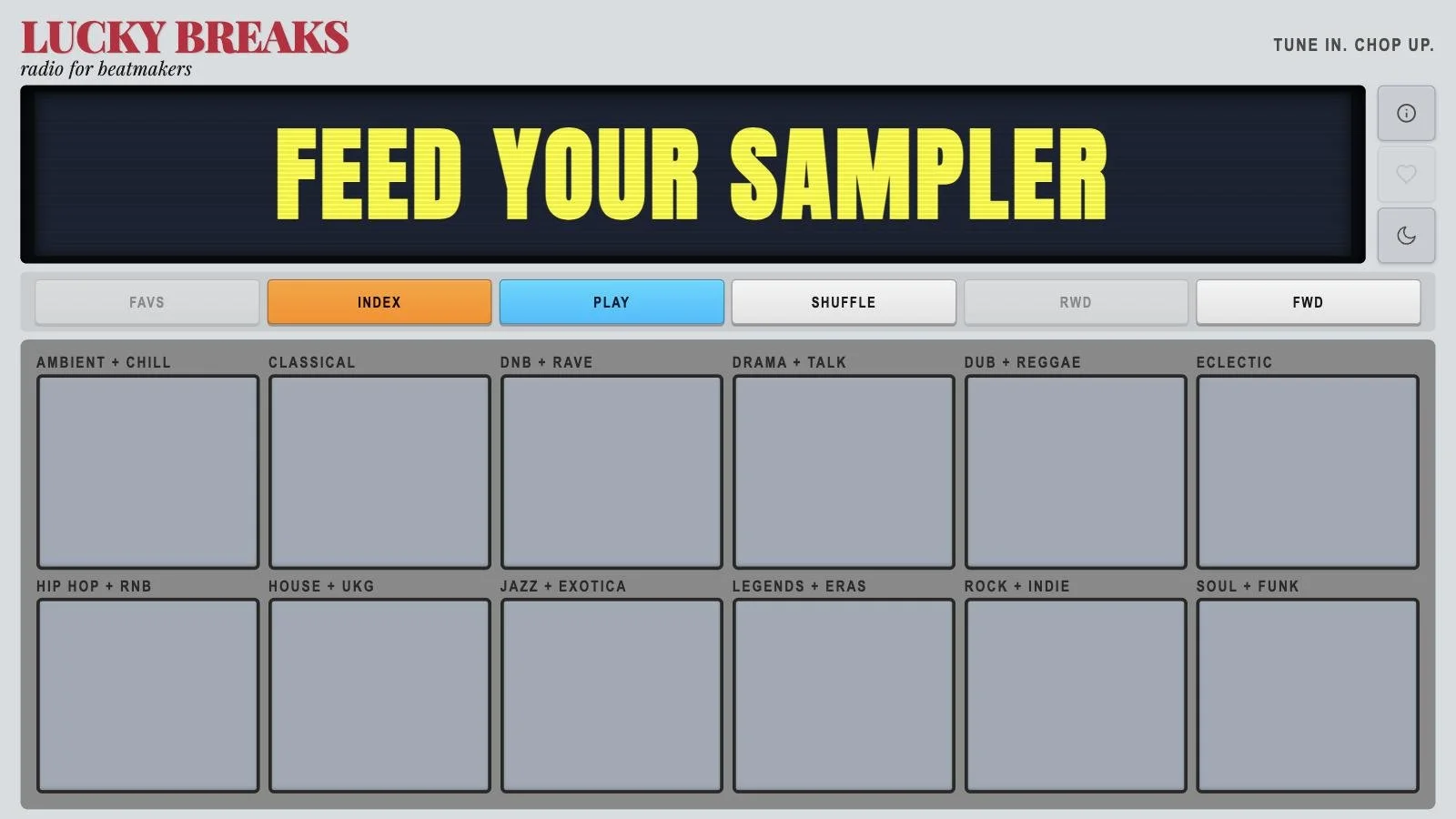
Lucky Breaks is a web-based radio player I built to bring that feeling into music creation workflow: stream live global internet radio stations, shuffle by genre, and sample serendipitously into whatever you are recording on. It is designed for the producer who leaves it running while they work, for the crate digger who wants to discover something unexpected, and for anyone who finds algorithm-driven playlists a bit too comfortable.
This is the story of how it got built, what went wrong, what I learned, and why I think it is one of the most satisfying projects I have made.
The Idea
I love digging through records and YouTube to find samples but I often get tired of the usual options and want to be surpised. What I actually wanted was a little bit of control (genre, roughly), a lot of surprise (which station, what is playing right now), and zero friction.
The design I kept coming back to was based upon a drum machine: something physical-feeling, immediate, and built for a specific purpose. Not a general music app. A tool for a particular kind of listening and audience.
So I built Lucky Breaks as exactly that: a dedicated radio instrument with a hardware aesthetic, a library of hand-picked stations, and a set of controls that feel more like a piece of gear than a website.
What It Does
Genre Pads
The heart of the interface is a grid of 12 genre pads, each one a physical-feeling button:
Ambient + Chill
Classical
DNB + Rave
Drama + Talk
Dub + Reggae
Eclectic
Hip Hop + RNB
House + UKG
Jazz + Exotica
Legends + Eras
Rock + Indie
Soul + Funk
Tap a pad and the player instantly shuffles into a live station from that category. No loading screen, no playlist to scroll through. You get something immediately.
Shuffle, Forward, Rewind
The SHUFFLE button picks a completely random station from the full library. FWD skips ahead to another station in the current pool. RWD steps back through your session history, so you can return to something that caught your ear a minute ago. It is non-destructive: your history stays intact and you can navigate it freely.
Favourites and Cross-Device Sync
Every station has a heart button. Save a station to your Favourites and it lives locally in your browser. Activate FAVS mode and the player browses only your saved stations. You can combine it with genre pads to filter your favourites by genre, or hit SHUFFLE in FAVS mode to jump randomly between them.
The sync feature was one of the more interesting things to build.
I wanted people to be able to move their favourites between devices without accounts, without email, without any friction at all. The solution is a six-character code: tap Generate, get a code, type it into another device, your favourites transfer instantly. Under the hood this writes a list of station IDs to a Supabase table keyed to that code. Codes expire after 30 days. No accounts, no personal data stored anywhere.
The Display Screen
The screen in the middle of the interface was the part I spent the most obsessive time on. Rather than a simple "now playing" label, it has four modes you cycle through by tapping:
Station name and description, sharp and centred, in a phosphor yellow typeface on a dark background
A genre-specific 3D wireframe animation
A massive scrolling ticker that fills the entire screen with the station name and description.
The screen persists across everything: skip a station, change genre, rewind, the display stays exactly where you left it. If you are watching the visualiser and you hit forward, the visualiser keeps running, just with the new station's animation morphed in.
The Station Index
Every station is searchable in a full directory: search by name, filter by genre, tap to tune in, or press the arrow next to any station to visit its website directly.
Night Mode
A tap on the moon icon switches the whole interface from the default yellow-on-cream palette to a dark midnight mode with a blue phosphor glow. It is a completely different feel, better for late-night sessions.
The Design Language
The visual starting point was hardware: MPC pads, drum machine buttons, the kind of gear that has real physical weight and a distinctive visual grammar. Everything has a slightly tactile quality: buttons cast small shadows and depress on press, the screen has a faint CRT scanline overlay, the typefaces are monospace and bold.
The colour palette in light mode is warm and slightly vintage: cream backgrounds, deep charcoal labels, yellow phosphor on the screen. Dark mode swaps to near-black with a deep navy blue that gives everything a cool late-night radio station feel.
I wanted the interface to feel like a dedicated piece of equipment, not a web app. The fact that you can install it as a PWA on any home screen (iPhone, Android, desktop) reinforces that: once it is on your home screen, there is no browser chrome, no URL bar, nothing to break the illusion that you are using a piece of software built for a specific purpose.
The Technical Stack
React 18 + TypeScript + Vite
The obvious choices for a fast, type-safe modern web app. Vite in particular made the development experience painless: near-instant hot reloads, clean production builds, and dead simple Vercel deployment via GitHub push.
CSS Modules
I used CSS Modules throughout rather than a CSS-in-JS solution. The component isolation is clean, there is no runtime overhead, and the CSS custom properties system handles theming elegantly: every colour, font size, and spacing value lives as a --variable at the root level. Dark mode is a single data-theme='dark' attribute on the document root that flips everything via cascade.
Three.js for the Visualiser
The 3D wireframe visualiser is built with Three.js. There are 12 distinct animation modes, one per genre, each one a different wireframe geometry and motion pattern: a torus knot for DNB + Rave, a shifting lattice for Ambient, a spinning dodecahedron for Jazz, and so on. When you change genre, the current animation lerps out and the new one morphs in.
The speed slider on the left edge of the visualiser was an interesting challenge. The naive implementation used clock.getElapsedTime() as the time source for every animation, which meant the slider could not affect modes that relied purely on wall-clock time. The fix was to introduce a virtual time accumulator: every frame, instead of reading absolute elapsed time, the animation increments vTime by delta * speedMultiplier. All 12 modes read from vTime and scaledDelta rather than real time, so the slider works uniformly across every animation.
Framer Motion
Framer Motion handles all the transitions: the modal slides, the genre pad animations, the screen fade-ins, the AnimatePresence exits.
Supabase for Favourites Sync
The cross-device sync backend is a single Supabase table with three columns: code, station_ids, and updated_at. Push writes a row with a generated code and an array of station IDs. Pull reads it back. No auth, no user model, no complexity. The six-character codes are generated from an unambiguous character set to make them easy to type on mobile.
Google Sheets as the Station CMS
This one was born out of practicality. Managing 295 stations across 12 genres in a JSON file or a database is tedious. Managing them in a spreadsheet is natural: you can sort, filter, batch-edit, share with collaborators, and add new stations without touching a text editor. A small sync script reads the sheet and generates a TypeScript file (stations.ts) that is committed to the repo. No runtime API calls, no rate limits, no dependency on the sheet being available: the station data is baked into the build.
The Things That Went Wrong!
The Web Audio API Trap
Early on I added a Web Audio API analyser with the idea of driving the visualiser from actual audio frequency data rather than synthetic animation. This required creating a MediaElementAudioSourceNode from the audio element, which reroutes the audio stream through the Web Audio graph before it reaches the speakers.
The problem: on mobile (particularly iOS Safari), the AudioContext suspends itself aggressively to save battery, and many radio stream URLs are served without the CORS headers required for Web Audio to access them. The result was that the visualiser code silently killed the audio completely on a large percentage of devices and streams. You would hit play, the buffer would load, and then nothing. No error, just silence.
The fix was to remove all of it. The visualiser now runs on synthetic animation entirely: Three.js driving geometry transforms and morphs, independent of the actual audio signal. The loss in data-driven reactivity is real, but the gain in reliability across every device and every stream is more important for a tool people are supposed to actually use.
The Vercel Build Mystery
This was the most frustrating debugging session of the project. After a routine refactor, Vercel started failing every build with a cryptic exit code 2 on npm run build, while the exact same command ran perfectly locally and passed every GitHub Actions check.
The breakthrough came from checking the GitHub Deployments API against every commit in the history. Every deployment from a certain date forward had failed. Removing one line fixed every build immediately. An hour of investigation for a one-word change. Eesh.
The Numbers
295 stations across 12 genres, all picked and curated by myself
12 distinct Three.js visualiser animations, one per genre
3 display modes cycling in order: static name, visualiser, scroll ticker
6-character sync codes for cross-device favourites transfer
Zero user accounts, zero tracking, zero ads
Fully installable as a PWA on any device
What I Would Do Differently
The station data pipeline works well but the sync between the Google Sheet and the repo is a manual step. I would automate that with a GitHub Action on a schedule, or a webhook from the sheet, so new stations appear in the live app without needing a manual commit.
The Web Audio experiment taught me to test on real mobile hardware earlier. The behaviour of AudioContext across iOS Safari versions, especially around CORS and background state, is sufficiently different from desktop Chrome that desktop-only testing gives a false sense of confidence.
Try It
Lucky Breaks is live at luckybreaks.xyz.
Install it to your home screen, plug in headphones, hit a genre pad, and catch a break.
Let me know what you think!
And if you are a station owner and want your stream included or removed, drop me a message below.
